
Web Security
Unrivalled user experience
Unique architecture eliminates the need to proxy web traffic. 11+ global data centres for guaranteed ultra-fast response times.
Empower the mobile workforce
Web Security provides roaming, personal (BYOD) and guest device support with zero-touch configuration and follow-the-user filtering.
Total flexibility & transparency
Rapid and flexible policy creation with a unique visual rule builder that enables powerful web access control without impacting users.
 + combine with other security products to unlock the benefits of ASE

Enable traditionally silo’d products to share and react to security events and state data whilst leveraging world class threat intelligence. Prevent attacks before they enter the kill chain.
Total web security for today's threats
The web has changed – secure web gateways haven’t. Censornet Web Security provides next generation protection from all web-related threats.
Dangerous content

Harmful, offensive, inappropriate or illegal content on malicious pages or hidden deep within legitimate sites.
 Web-borne malware

Malware distribution sites, compromised pages on legitimate sites, malvertising and infected files either downloaded or cloud-shared.
 Inappropriate images

Inappropriate ‘Not Safe For Work’ (NSFW) images – including adult, offensive and extremist content.
How Censornet Web Security works
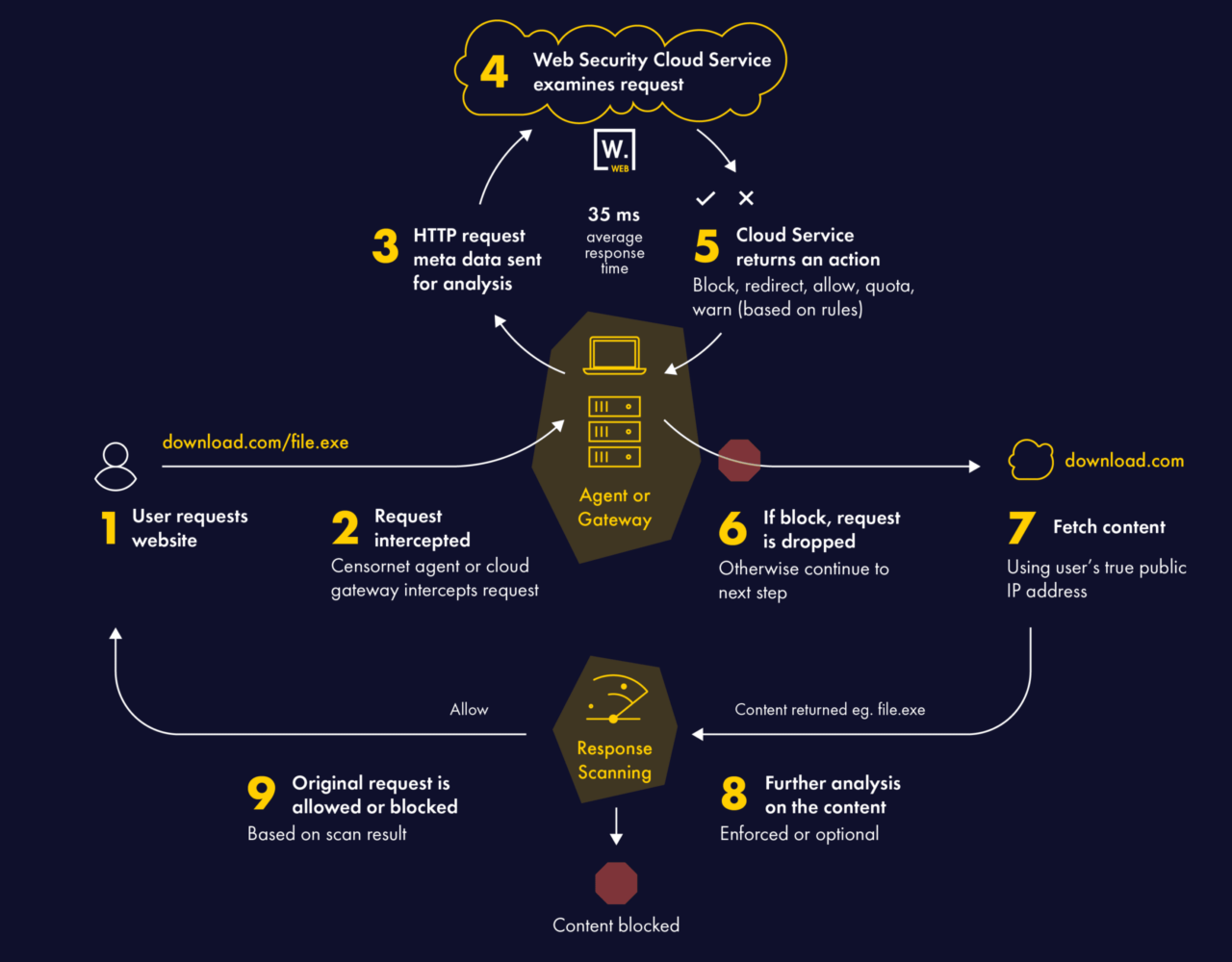
Unique architecture eliminates the need to proxy web traffic, preserving the user’s real IP address and upholding privacy by allowing the browser to maintain direct communication with the web application server.
Features & Benefits of Web Security
Threat protection

 Encrypted sites

Automatic unknown URL classification

 Guest and Captive portals

Powerful policies

Page level categorisation

Intuitive user interface
Interested in finding out more?
What Our Customers Say




Web Security stats
Our platform
Total visibility, seamless authentication and powerful intelligence.
All at your fingertips with integrated email, web and cloud security with identity and context.







Pioneering ASE technology