Email Security
from known, unknown and emerging email security threats. Stop large-scale
phishing, targeted attacks, impersonation fraud and malware in their tracks with
a comprehensive, cloud email security solution.
Unparalleled Email Security Threat Protection
Email Security incorporates multiple technologies to ensure enterprise class threat detection rates with very high accuracy - over and above what single engine solutions can provide.
Total Control Over Mail Flow
Email Security combined with a full cloud based mail routing engine. Easily support multiple email service providers within a single domain and migrate between providers with ease.
Stop Impersonation Fraud in its Tracks
CEO Impersonation fraud is increasing exponentially. Email Security provides multi-layered protection incorporating unique features to defend against the modern email threat.
 + combine with other security products to unlock the benefits of ASE

Enable traditionally silo’d products to share and react to security events and state data whilst leveraging world class threat intelligence. Prevent attacks before they enter the kill chain.
Advanced Email Security & Protection
Censornet Email Security solution provides unparalleled and comprehensive protection for your business email users across all major email threats.
Traditional threats

Including spam, viruses, large-scale phishing attacks and malicious URLs.
 Impersonation attacks

Modern, targeted and sophisticated email threats including Business Email Compromise (BEC) and CEO fraud.
 Malware

Incorporates multiple traditional signature based and behavioural AV engines.
 Advanced DLP

Native integration with enterprise-grade DLP for ultimate email protection and data security.
How Censornet Email Security works
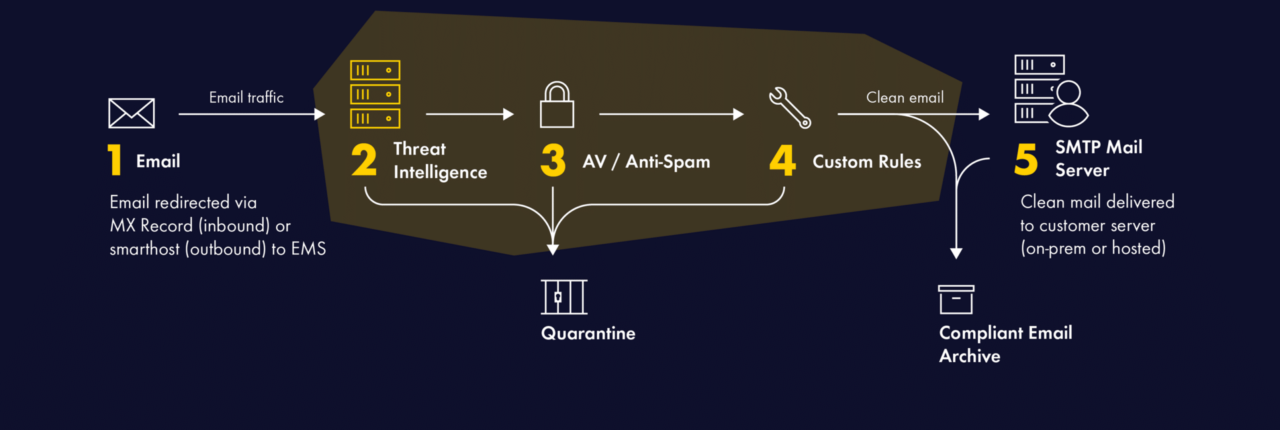
Email Security is 100% cloud based – making it quick and easy to set up – with just a simple MX record change, your mail flow is immediately protected.
Features & Benefits of Email Security
 10,000+ algorithms

Multi-layered threat protection

 LinkScan™

 Outbound email filtering

Advanced mail routing engine

Email Encryption, Compliant Archiving & Continuity
Intuitive user interface
Interested in finding out more?
-
Compliant Email Archive
-
Reduce email data risks, optimise storage costs, and improve productivity.
Analysis has shown that as much as 60% of business data is stored in email – and much of it exclusively (Source: IDC).
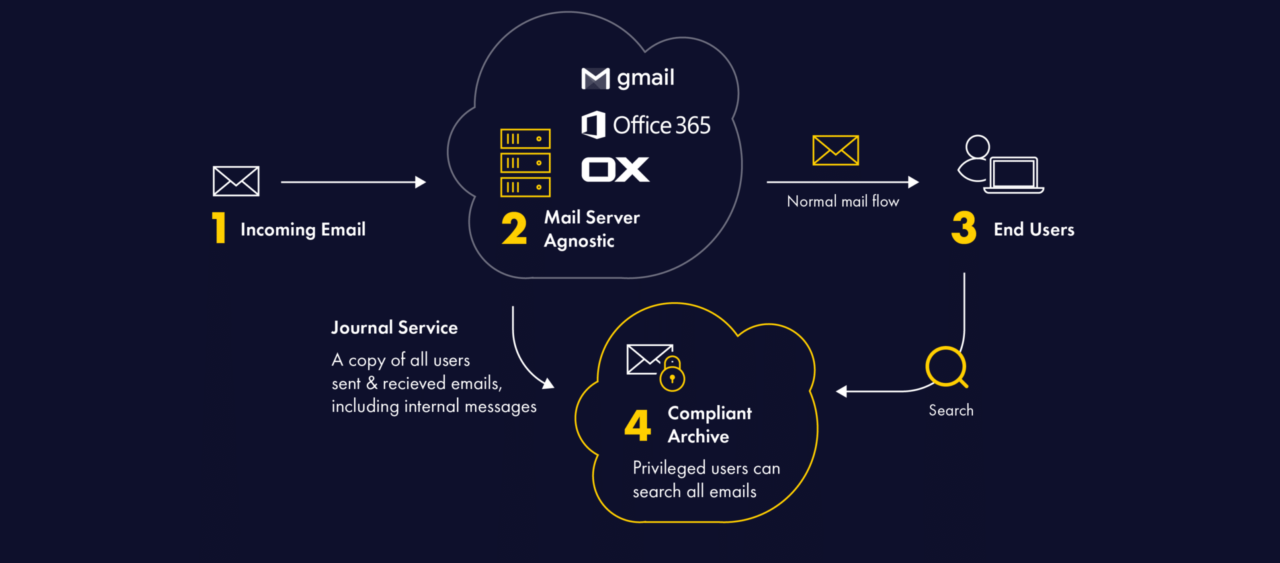
The Compliant Email Archive from Censornet captures and stores every message sent or received in a separate, secure, tamper-proof database in the cloud. Archived messages are de-duplicated, compressed, indexed and encrypted.
An intuitive search interface – accessible from any device – allows IT, HR, and end users themselves, to quickly find emails using multiple search criteria. Privileged users can rapidly search all mailboxes, or selected mailboxes, to respond to internal or regulatory requests.
- Cost effective – licenses are only required for active users
- Storing messages on a separate server can reduce premium mail server storage costs by up to 75%
- Messages and attachments are fully indexed for lightning fast search
- Users can search for and restore lost or deleted emails – without calling the helpdesk
- Retention control automatically deletes messages as they age with the option to store messages indefinitely
- In the event of a primary email service outage users have access to historic email via a web interface, accessible from any location and any device
-
Email Encryption – Censornet SecureMail
-
Censornet SecureMail is an add-on to Email Security and provides a simple, yet effective, solution for user-based encryption of specific messages.
Adding a customisable keyword to the start of the email message subject sends a message containing a secure link to the recipients that log in to a secure website to view the contents of the message.
SecureMail complements the policy-based encryption capabilities integrated within Email Security, with the ability to enforce the use of TLS for specified domains, as well as to use Opportunistic TLS for all messages – falling back to non-encrypted connections only if the receiving email server does not support TLS.
-
Advanced Email Sandbox
-
Add an extra layer of enhanced protection to Email Security.
The optional Advanced Email Sandbox protects against today’s evasive zero-day threats by providing a highly scalable and powerful environment to run in-depth, sophisticated analysis of unknown or suspicious programs and files.
The Advanced Email Sandbox service adds a powerful layer of protection to Email Security, alongside multiple tier-1 signature and behaviour-based antivirus (AV) engines. The Sandbox service analyses suspicious files in depth, detonates payloads in a contained virtual environment, scrutinises their behaviour, and identifies malicious intent.
Sandbox technology provides advanced threat protection and zero-day exploit detection by:
- Leveraging purpose-built, advanced machine learning algorithms, aggressive behaviour analysis, anti-evasion techniques and memory snapshot comparison to detect threats
- Helping uncover malicious files including polymorphic and other threats designed for undetectable targeted attacks
- Fully integrating within Censornet Email Security for analysis of email file attachments with support for a broad range of file types.
Censornet’s Advanced Email Sandbox is a cost-effective sandbox solution for protection that goes above and beyond that provided by standard antivirus engines.
What Our Customers Say

This also means we are able to audit outgoing communications to ensure no information is leaving the business that shouldn’t, and follow up if any suspicious requests are made. From an inbox perspective this means the correct categorisation of emails, and a huge reduction in spam making it to employees, which is great news for our staff who can now actually trust what’s coming in.

Censornet gives us advanced security and also has a far more personal and specialised security service.

We have received no spam and no junk mail at all. It represents excellent value for money and I have had no hesitation in recommending it to my colleagues within the online IT community.

The solution provides us with a level of security over and above that which other well-known brands could provide and is much less complicated to use. And as we grow as a business, we know that it will grow with us.
Statistics
Robust and powerful email security protection for global organisations.
Our platform
Total visibility, seamless authentication and powerful intelligence.
All at your fingertips with integrated email, web and cloud security with identity and context.







Pioneering ASE technology